

TL;DR
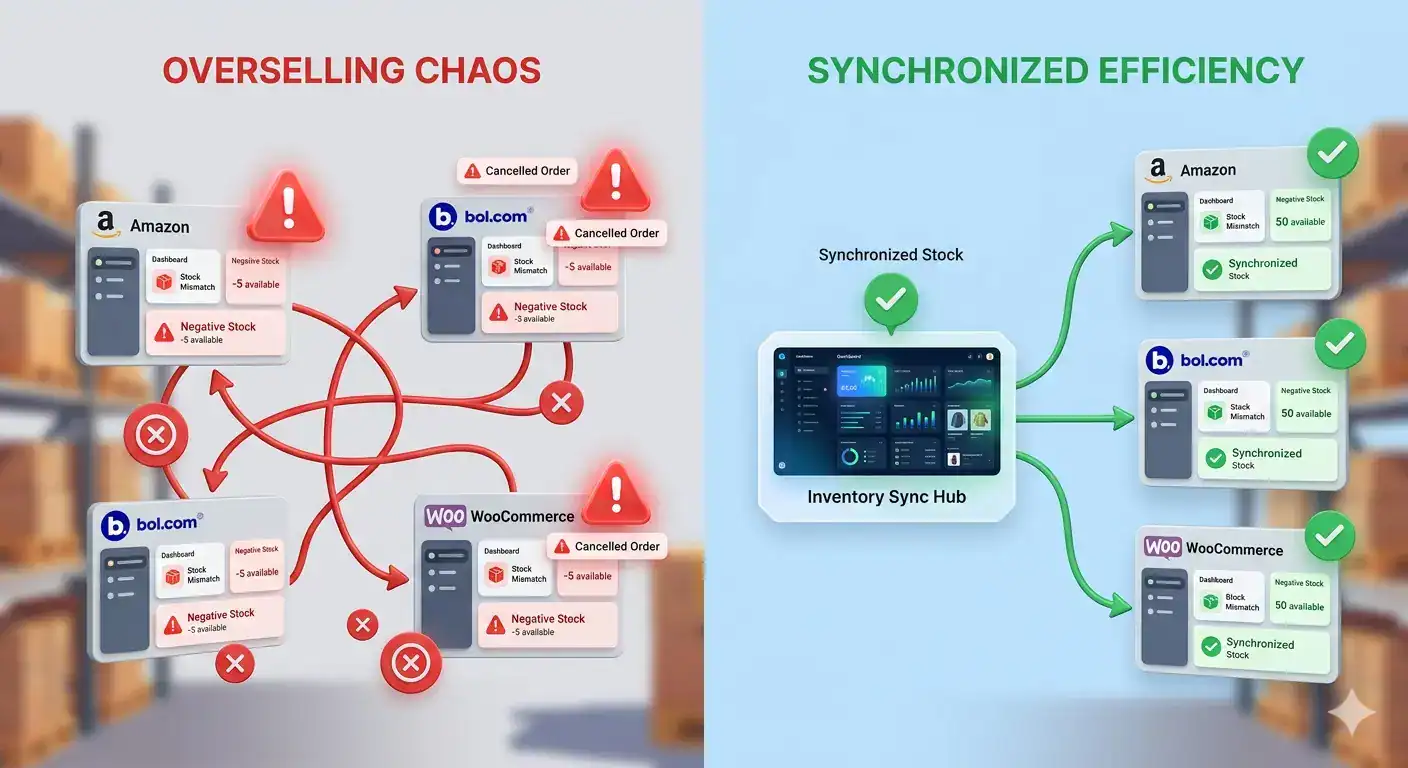
- Overselling happens when stock levels aren’t synced fast enough across your sales channels.
- A single out-of-stock incident on bol.com or Amazon can result in account warnings, lost Buy Box position, and cancelled orders.
- Manual stock management breaks down once you sell on 2 or more channels simultaneously.
- Automated inventory sync updating every 5 to 15 minutes is the only reliable way to prevent overselling at scale.
- Tools like Koongo synchronise your stock across 500+ channels automatically, with no manual work required.
If you sell on more than one platform, you’ve probably experienced it: a customer orders a product on bol.com, but your Shopify store already sold the last unit an hour ago. The result is a cancelled order, a frustrated customer, and a penalty from the marketplace.
This problem called overselling is one of the most common and costly mistakes in multi-channel e-commerce. Research from marketplace operations teams shows that merchants selling on 3 or more channels without automated sync face overselling incidents on average 2 to 4 times per month. Each incident costs real money: refund processing, customer service time, and sometimes account suspension.
The good news is that overselling is almost entirely preventable. This guide explains why it happens, what it costs your business, and how to fix it permanently.
Key Takeaways
- Stock updates need to happen every 5-15 minutes across all channels to prevent overselling.
- The real cost of a single overselling incident is €50-€200+ when you factor in refunds, time, and platform penalties.
- Manual CSV uploads and spreadsheet tracking cannot scale beyond 2 channels reliably.
- Automated inventory sync eliminates the root cause, not just the symptoms.
Obsah
- What causes overselling when selling on multiple channels?
- What is inventory synchronisation and why is it critical?
- What happens when a customer orders an out-of-stock product?
- How fast do stock updates need to be to prevent errors?
- What are the real business costs of overselling?
- How automated inventory sync solves the problem permanently
- A real scenario: what automated sync looks like in practice
- Frequently Asked Questions
- Summary: how to stop overselling for good
What causes overselling when selling on multiple channels?
Overselling happens when the same product is sold to more than one customer before your stock count updates across all your sales channels. The core issue is timing: your inventory changes instantly on one platform, but competing channels are still showing the old stock number.
Here is a common scenario: you have 1 unit of a product left. At 14:02, a customer buys it on your WooCommerce or Shopify store. At 14:04, before that sale has synced to bol.com, a second customer orders the same item there. You now have two orders and zero stock.
The main causes of overselling:
- Manual stock updates: you rely on spreadsheets or CSV uploads that happen once per day (or less)
- Slow feed refresh: your marketplace connection only updates stock every few hours
- No central inventory source: each channel manages stock independently
- No safety buffer: you list all available stock with no reserve held back

What is inventory synchronisation and why is it critical?
Inventory synchronisation is the automatic, real-time updating of stock levels across every sales channel whenever a purchase is made. When a customer buys a product on any connected platform, the system immediately reduces the available quantity on all other channels.
Without synchronisation, every channel operates on outdated information. With synchronisation, your stock is always accurate whether a sale happens on Amazon, bol.com, or your own webshop.
| Without Sync | With Automated Sync |
| Stock updated manually, once per day | Stock updates every 5-15 minutes automatically |
| High risk of overselling during peak hours | Overselling incidents reduced to near zero |
| Each channel shows different stock levels | All channels show consistent, accurate quantities |
| Requires manual checking after every sale | Fully automated – no manual work required |
| Scales poorly beyond 2 channels | Works seamlessly across 500+ channels |
What happens when a customer orders an out-of-stock product?
When overselling occurs, you have two bad options: cancel the order (damaging your seller metrics) or fulfil it at a loss by sourcing stock elsewhere. Neither option is good for your business.
The consequences go beyond the single order. Marketplaces track cancellation rates closely. On bol.com, a cancellation rate above 2% triggers account warnings. On Amazon, repeated overselling can lead to listing suspension or account deactivation.
The direct and indirect costs of a single overselling incident:
- Refund processing: €5-€15 in payment fees and administration time
- Customer service handling: 30-60 minutes of staff time per incident
- Negative review risk: dissatisfied customers often leave 1-star reviews
- Marketplace penalty: cancelled orders lower your seller score and Buy Box eligibility
- Lost future sales: a lower seller rating reduces visibility in search results
When you add these up, a single overselling incident typically costs between €50 and €200. For a merchant with 50-100 daily orders, even 2 incidents per month represents a significant drag on profitability.

How fast do stock updates need to be to prevent errors?
The required update frequency depends on how quickly your products sell. For fast-moving items like electronics, fashion, seasonal products stock can change within minutes. For slower-moving categories, hourly updates may be sufficient.
As a general rule: if you process more than 20 orders per day across all channels, you need stock updates at least every 15 minutes. If you process 50+ orders per day, updates every 5 minutes are recommended.
| Daily Order Volume | Recommended Update Frequency | Risk Without It |
| Under 20 orders/day | Every 60 minutes | Low – occasional incidents possible |
| 20-50 orders/day | Every 15 minutes | Medium – regular incidents likely |
| 50-200 orders/day | Every 5-15 minutes | High – multiple incidents per week |
| 200+ orders/day | Every 5 minutes or real-time API | Critical – daily incidents guaranteed |
Koongo syncs inventory every 5, 15, or 30 minutes depending on your plan so your stock counts stay accurate across all connected channels without any manual work.
What are the real business costs of overselling?
Most merchants focus on the immediate refund cost when thinking about overselling. The real cost is significantly higher when you account for long-term marketplace performance impacts.
| Cost Category | Typical Impact | Notes |
| Refund and processing fees | €5-€20 per incident | Payment processor fees are non-refundable |
| Customer service time | 30-60 min per incident | At €25/hour: €12-€25 per incident |
| Marketplace seller score | Drops 5-15% per incident | Affects Buy Box eligibility for weeks |
| Lost visibility | 10-30% fewer impressions | Lower score = lower search ranking |
| Negative reviews | 1-2 per 10 incidents | Hard to recover from on bol.com |
| Account suspension risk | >2% cancellation rate triggers warnings | Amazon and bol.com both enforce this |
A merchant with 500 products selling across 3 channels who experiences just 4 overselling incidents per month a conservative estimate without automation faces a real monthly cost of €400 to €800 when all factors are included.
How automated inventory sync solves the problem permanently
Automated inventory synchronisation eliminates overselling by creating a single source of truth for your stock levels your e-commerce store and pushing updates to every connected channel in real time.
Instead of manually exporting stock data, reformatting it, and uploading it to each marketplace, the integration handles everything automatically every time a sale or stock change occurs.
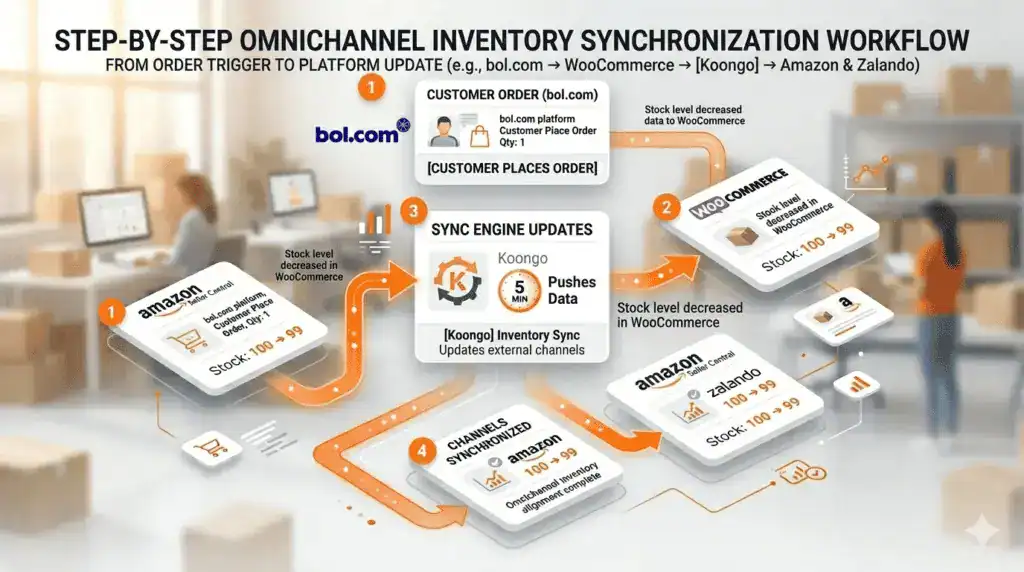
How automated sync works – step by step
- A customer purchases a product on any connected channel (your webshop, bol.com, Amazon, etc.)
- Your e-commerce platform (Shopify, WooCommerce, Magento) immediately updates the available stock count
- The integration reads the new stock level and pushes the update to all other connected channels
- Within 5-15 minutes, every marketplace shows the correct, reduced stock quantity
- If stock reaches zero, the product is automatically marked as unavailable across all channels
With Koongo’s Marketplace Manager, this entire workflow runs automatically. When you connect your Shopify or WooCommerce store, every sale on any channel triggers a stock update across all your other connected marketplaces without you touching anything.
A real scenario: what automated sync looks like in practice
Imagine you run a Dutch clothing store on WooCommerce. You sell on bol.com, your own webshop, and Zalando. You have 3 units of a particular jacket in stock.
| Time | Event | Without Sync | With Automated Sync |
| 10:00 | Jacket sells on webshop | WooCommerce: 2 units. Others: still show 3 | All channels update to 2 units within 5 min |
| 10:08 | Second jacket sells on bol.com | Risk: bol.com still shows 3, oversell possible | bol.com correctly shows 2 → order succeeds |
| 10:45 | Third jacket sells on Zalando | High risk of oversell if manual update pending | All channels now show 0, product goes offline |
| 10:46 | Customer tries to order on webshop | Order might go through oversell! | Product correctly unavailable no oversell |
The difference between these two scenarios is not just operational efficiency it’s the difference between a smoothly running multi-channel business and a constant firefighting operation.

Frequently Asked Questions
Koongo syncs inventory every 5, 15, or 30 minutes depending on your subscription plan. For merchants processing more than 50 orders per day, the 5 or 15-minute sync frequency is recommended to prevent overselling.
Yes. Most inventory sync tools, including Koongo, allow you to set a stock reserve for example, keeping 1 or 2 units off the marketplace listings even when they are available in your warehouse. This acts as a buffer during the sync interval.
This is called a race condition, and it can still occur even with automated sync during the sync interval window. The best protection is a combination of fast sync frequency (every 5 minutes) and a stock reserve buffer of 1-2 units on fast-moving products.
Yes. With a proper API-based integration, orders from any connected channel your webshop, Amazon, bol.com, Zalando all deduct from the same central inventory. Koongo’s Marketplace Manager handles two-way order and inventory sync for all connected marketplaces.
For a standard Shopify or WooCommerce store connecting to one or two marketplaces, the setup typically takes 1 to 3 hours using Koongo’s wizard-based interface. No coding is required. Koongo’s support team assists with complex configurations.
Overselling risk is highest on high-traffic marketplaces like Amazon and bol.com during peak hours (evenings and weekends) and during promotional events like Black Friday. These are precisely the times when slow or manual stock updates create the most damage.
Summary: how to stop overselling for good
Overselling is not a sign of poor operations it’s a structural problem that emerges naturally when you grow beyond two sales channels. The solution is equally structural: automated inventory synchronisation that updates stock across every channel within minutes of each sale.
Here is what to take away from this guide:
- Manual stock management is reliable up to 1-2 channels. Beyond that, automated sync is essential.
- Update frequency matters: aim for every 5-15 minutes if you process 20+ orders per day.
- The true cost of overselling is €50-€200+ per incident far higher than the cost of automation.
- A stock reserve buffer of 1-2 units provides extra protection during the sync window.
Koongo connects your Shopify, WooCommerce, or Magento store to 500+ channels marketplaces, advertising platforms, and comparison sites with automatic inventory sync built in. Plans start from €12/month, with a 7-day free trial and no credit card required to get started.
Continue reading →