Koongo MCP Is Live: Manage Your Ecommerce Operations with AI Assistants
Managing a multichannel ecommerce business usually means switching between dashboards, configuring integrations, mapping product attributes, creating feeds, checking product data, and managing marketplace orders.
Koongo MCP introduces a different way to handle these tasks through a conversation with your AI assistant.
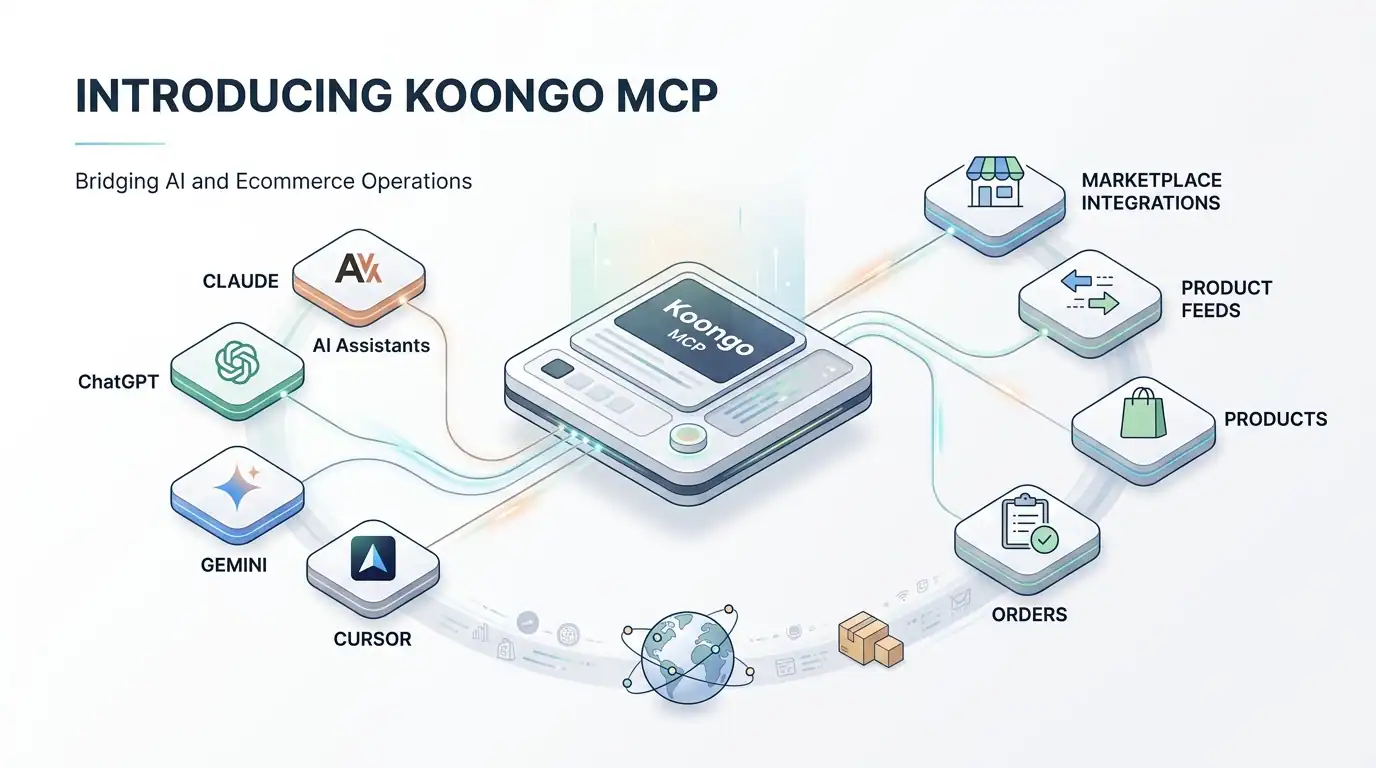
Koongo MCP is now live and connects MCP-compatible AI assistants such as Claude, ChatGPT, Gemini, and Cursor to your Koongo account. Instead of navigating every setting manually, you can describe what you want to accomplish and let the AI assistant work with supported Koongo tools and data on your behalf.
You can use it to create marketplace integrations, configure product feeds, map attributes and categories, enrich missing product information, inspect your setup, and work with marketplace orders.
Koongo MCP is available to Koongo customers on the new pricing model, including the Free plan, with no separate MCP fee currently planned.
TL;DR: Key Takeaways
Koongo MCP connects compatible AI assistants directly to Koongo, allowing you to work with your ecommerce setup through natural-language instructions.
You can use it with MCP-compatible clients including Claude, ChatGPT, Gemini, and Cursor.
Supported tasks include marketplace and advertising integrations, product feed creation, attribute mapping, category mapping, product enrichment, feed exports, and order management.
Each MCP connection can use either Read-only or Full access, so you decide whether an AI assistant can only inspect your account or also make supported changes.
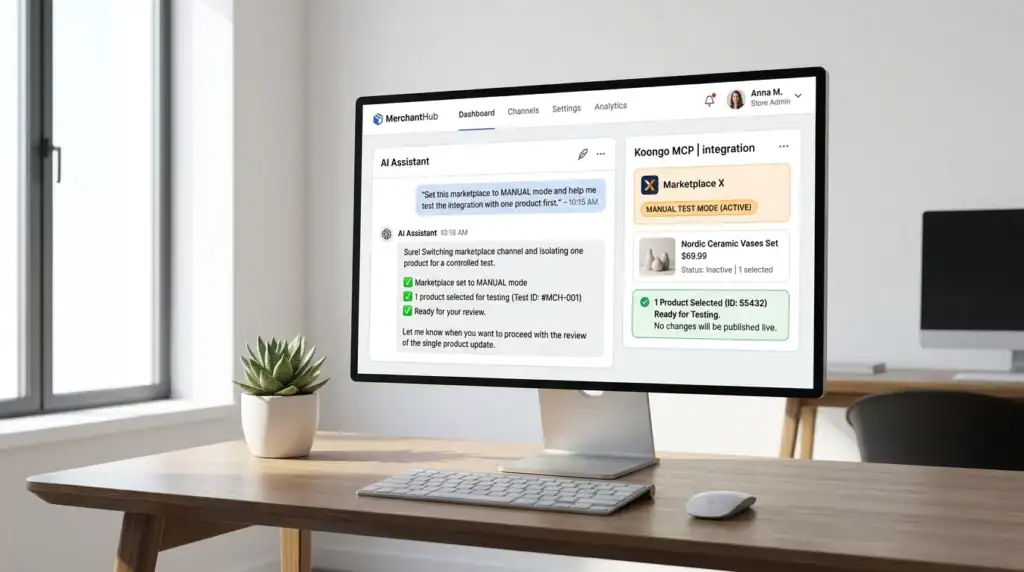
When testing marketplace integrations, MANUAL product mode can be used to avoid publishing an entire matching catalog at once.
Koongo MCP is included within Koongo’s current pricing model, including the Free plan, with no separate MCP fee currently planned.
Koongo MCP is a Model Context Protocol integration that allows compatible AI assistants to connect to a user’s Koongo account and interact with supported Koongo tools and data.
MCP, or Model Context Protocol, is an open standard designed to connect AI applications with external systems, tools, and data sources. You can learn more in the official Model Context Protocol documentation.
For Koongo merchants, the important part is what this enables in practice.
Traditionally, if you wanted to create a new product feed, configure a marketplace integration, map required product attributes, or inspect your setup, you would open Koongo and work through the relevant interface.
With Koongo MCP, your AI assistant becomes another way to interact with these capabilities.
Instead of searching for the right setting, you can make a request such as:
Create a Google Shopping feed for my store and help me map the required attributes.
Or:
I want to add an Amazon marketplace integration. Walk me through it one step at a time.
The assistant can then use the Koongo MCP tools available to your connection to work through the task.
How Does Koongo MCP Work?
Koongo MCP sits between your AI client and your Koongo account.
Once a compatible AI assistant is connected, it can access the Koongo capabilities permitted by that connection.
You can then describe a task in normal language. If the request is ambiguous, for example because you have multiple projects or several possible channels, the assistant can ask for clarification before continuing.
This changes the interface, but not the underlying ecommerce workflow.
For example, a marketplace integration may still require you to configure identifiers, product filters, categories, attributes, and the marketplace connection itself. The difference is that the AI assistant can guide you through those steps conversationally.
Marketplace login or authorization steps that require channel credentials are completed by the user in the browser. The AI assistant does not enter your marketplace credentials for you.
MCP therefore does not replace Koongo’s underlying marketplace and product feed management infrastructure. It provides a conversational way to work with supported parts of it.
If you are new to product feeds, read the Complete Guide to Product Feed Management to understand how product data is transformed and distributed across ecommerce channels.
What Can You Do with Koongo MCP?
Koongo MCP currently covers several core areas of multichannel ecommerce management.
1. Create marketplace and advertising integrations
You can ask the assistant to help create integrations for supported marketplaces and advertising channels.
For example:
Add an Amazon marketplace integration and walk me through the setup.
The assistant can create the integration and guide you through the available wizard steps, including identifiers, product filters, category mapping, attribute mapping, and supported order settings.
The actual marketplace authorization step remains in your browser.
Koongo’s existing Marketplace Integration Wizard supports integrations with marketplaces including Amazon, eBay, bol.com, Kaufland, and many others.
Koongo MCP can help create feeds for supported channels and work through the configuration process.
For example:
Create a Google Shopping feed for my store, help me map the required attributes, then generate the file and check it.
The assistant can help with tasks such as:
choosing a feed template,
creating the feed,
configuring category mapping where required,
mapping product attributes,
setting supported filters and settings,
generating the feed,
verifying the feed,
submitting it where the channel and integration method support submission.
This builds on Koongo’s existing Product Feed Management functionality for distributing and optimizing product data across ecommerce and advertising channels.
Different channels require different product fields and formats.
A marketplace or advertising platform may require attributes such as title, brand, price, GTIN, colour, material, condition, and other category-specific information.
With Koongo MCP, you can ask the assistant to identify missing required attributes and help map them to the appropriate fields in your store.
Show me which required attributes are still missing on my Google Shopping feed and help me map them.
This can be especially useful when expanding to a new sales channel whose product data requirements differ from those of your ecommerce platform.
4. Map product categories
Marketplaces and advertising channels often maintain their own category taxonomies.
Your store category might be called “Running Shoes”, while the destination channel expects products to be assigned to a specific branch of its own category tree.
Koongo MCP can inspect missing category mappings, search the available channel taxonomy, suggest suitable target categories, and create mappings where supported.
5. Enrich missing product attributes
Koongo MCP can also work with product enrichment.
The AI assistant can derive missing values such as colour, gender, or material from available product information and save the resulting values as additional attributes that can later be used for mapping or filtering.
This can help when a destination channel requires information that is not consistently structured in the original store catalog.
As with any AI-derived product data, merchants should review important values before relying on them across live sales channels.
6. Work with marketplace orders
For marketplaces that support order synchronization through Koongo, MCP can also help with order-related workflows.
Depending on the available connection, you can ask the assistant to view order information and manage supported order connections.
Fetch my latest orders.
Or:
Turn on order sync for my Amazon marketplace and help me configure the order settings.
The availability of specific order functionality depends on the marketplace and integration.
Read-only vs Full Access
Every Koongo MCP connection has its own access level.
Access mode
What the AI can do
Best suited for
Read-only
List, inspect, preview, verify and validate supported information without performing write actions.
Reporting, troubleshooting, account inspection and first-time testing.
Full Access
Read information and perform supported actions such as creating integrations, configuring feeds, mapping attributes and exporting feeds.
Merchants who want to actively manage their Koongo setup through an AI assistant.
Read-only access
A Read-only connection can inspect information but cannot use write tools.
If the AI attempts to perform a write action through a Read-only connection, Koongo refuses the operation.
This makes Read-only a useful starting point if you want to explore MCP for reporting, inspection, troubleshooting, or understanding your current configuration without allowing the assistant to modify it.
Full Access
A Full Access connection can both read information and perform supported changes.
This can include creating and configuring feeds, creating marketplace or advertising integrations, mapping attributes, mapping categories, exporting supported feeds, and other available write operations.
Access is configured per connection, not for the entire Koongo account.
Koongo MCP is designed to work with MCP-compatible AI clients.
Clients currently being used with Koongo MCP include:
Claude
ChatGPT
Gemini
Cursor
Connection options depend on the AI client and can include OAuth authentication or a static token.
Because MCP is an open protocol rather than a Koongo-specific AI interface, Koongo is not limited to a single AI provider. Other compatible MCP clients may also be connected where their MCP implementation supports the required connection method.
at least one Koongo project with your store connected and product data imported,
an MCP-compatible AI client.
Koongo supports connection through OAuth or a static token, depending on the client.
OAuth
With OAuth, you authenticate through the browser and select the access level you want to grant to the connection.
You can choose between Full Access and Read-only.
Static token
A static token can be generated from the MCP section of your Koongo account.
You can also configure whether that token should use Read-only access before generating it.
Once connected, a simple first test is:
List my Koongo projects.
If the assistant can return the project information available to the connection, you are ready to start working with Koongo through MCP.
For exact client-specific instructions, use the Koongo MCP Help Center, as configuration can differ between AI clients.
Practical Koongo MCP Use Cases
The easiest way to understand Koongo MCP is through the tasks it can help with.
Use case 1: Set up a new marketplace integration
I want to add an Amazon marketplace integration. Walk me through it one step at a time.
The assistant can create the integration and guide you through the setup sequence.
If you are new to marketplace integrations, the Koongo marketplace integration page explains how Koongo connects stores to ecommerce marketplaces.
Use case 2: Find missing feed attributes
Show me which required attributes are still missing on my Google Shopping feed, then help me map each one to the right field from my store.
This combines inspection with guided attribute mapping.
Use case 3: Fix category mapping
Which of my store categories aren’t mapped yet? Suggest the best matching target category for each.
The assistant can inspect mapping gaps and work with the destination channel’s taxonomy.
Use case 4: Build a new product feed
Create a Google Shopping feed, include only in-stock products, help me map the required attributes and generate the feed.
Instead of treating feed creation as several disconnected tasks, the conversation can carry the context from one step to the next.
Use case 5: Inspect your Koongo account without changing anything
List my integrations and tell me which ones need attention.
Using a Read-only connection allows the assistant to inspect supported information without granting permission to modify the setup.
Use case 6: Test a marketplace integration with MANUAL mode
One important distinction when working with marketplace integrations is MANUAL vs AUTO product mode.
When testing a new setup, MANUAL mode can be used to control which products are published rather than immediately applying the setup to the full matching catalog.
Set this marketplace to MANUAL mode and help me test the integration with one product first.
Why MCP Changes Multichannel Ecommerce Management
Multichannel ecommerce platforms have traditionally been built around graphical interfaces.
That means users need to understand where functions live and how different parts of the system connect.
MCP adds another interface: natural language.
The important change is not that AI replaces product feeds, marketplace APIs, mappings, rules, or synchronization. Those systems still perform the underlying ecommerce work.
What changes is how a merchant can interact with them.
Instead of searching for a category mapping screen, you can ask:
Which categories still need mapping?
Instead of manually locating product filtering rules, you can ask:
Only include products that are currently in stock.
A conversational interface can be particularly useful for marketplace setups that involve identifiers, category taxonomies, required attributes, product filters, authorization, listing configuration, and order settings.
It can also lower the learning curve for team members who understand what they want to accomplish but do not yet know every part of Koongo’s interface.
Experienced ecommerce managers can use MCP as another way to inspect configurations, work with mappings, create feeds, and perform supported actions using an AI client they already use.
Koongo MCP Pricing and Availability
Koongo MCP is available within Koongo’s current modular pricing model and there is currently no separate MCP fee planned.
Koongo also offers a permanent Free Plan, which can be used to test the platform before moving to a paid setup.
Koongo module
Starting price
What it is designed for
Free Plan
€0
Testing Koongo with limited resources.
Feeds Module
€24/month
Product feeds for channels such as Google, Meta, TikTok, comparison engines, and other feed-based destinations.
Ads Module
From €39/month
Connecting and synchronizing product data with advertising platforms.
Marketplace Module
From €69/month per marketplace
Marketplace API integration with product and order management.
The Feeds Module currently includes five feeds for €24/month, while the Marketplace Module starts at €69/month per marketplace on the Starter plan. Additional marketplaces and resources can change the final monthly cost.
For the latest prices, limits, update frequencies, and module details, always check the official Koongo pricing page.
Koongo MCP is Koongo’s implementation of the Model Context Protocol. It allows compatible AI assistants to connect to a Koongo account and interact with supported ecommerce tools and data. Depending on the connection’s access level, the assistant can inspect information or perform supported actions such as creating integrations and feeds, mapping attributes and categories, exporting feeds, and working with orders.
Which AI assistants work with Koongo MCP?
Koongo MCP works with MCP-compatible AI clients. Clients currently being used with Koongo include Claude, ChatGPT, Gemini, and Cursor. Connection and authentication methods can differ between clients, so merchants should follow the current Koongo MCP documentation.
What can I manage with Koongo MCP?
Supported Koongo MCP workflows include marketplace and advertising integrations, product feed creation and export, attribute mapping, category mapping, product enrichment, account inspection, and supported order-management tasks. Specific capabilities can depend on the channel and integration type.
Does Koongo MCP cost extra?
Koongo currently does not plan a separate charge for MCP. MCP is available as part of Koongo’s current pricing model, including the Free Plan.
How much does Koongo cost?
Koongo offers a permanent Free Plan. Under the current modular pricing model, the Feeds Module starts at €24/month, the Ads Module starts at €39/month, and the Marketplace Module starts at €69/month per marketplace. Pricing can increase depending on the modules, resources, marketplaces, products, and other options used.
What is the difference between Read-only and Full Access?
Read-only allows the connected AI assistant to inspect supported information but prevents write operations. Full Access allows the assistant to both read information and perform supported changes, such as creating integrations, configuring feeds, changing mappings, and performing other available write operations.
How can I reduce the risk of publishing products while testing a marketplace integration?
When testing a marketplace integration, use MANUAL product mode and begin with a limited product set. This gives you an opportunity to review the setup before using broader product publishing settings.
Conclusion
Koongo MCP adds a conversational way to work with multichannel ecommerce operations.
Instead of relying only on dashboards, menus, and configuration screens, merchants can use compatible AI assistants to interact with supported Koongo capabilities using natural-language instructions.
The underlying ecommerce infrastructure remains the same. Product feeds still need accurate data, marketplace integrations still need correct configuration, attributes and categories still need mapping, and marketplace orders still rely on reliable synchronization.
What changes is how you can manage those processes.
You can inspect your existing setup with Read-only access, create product feeds, configure supported marketplace integrations, work with product mappings, enrich missing attributes, or manage supported order workflows through an MCP-compatible AI assistant.
Koongo uses cookies to improve your experience. By clicking “Accept”, you consent to the use of ALL the cookies. However, you may visit Cookie Settings to provide controlled consent. Cookie settingsACCEPT
Cookies
Privacy Overview
Koongo uses cookies to improve your experience while you navigate through the website. These cookies will be stored in your browser only with your consent. Learn more
Necessary cookies are absolutely essential for the website to function properly. This category only includes cookies that ensure the basic functionalities and security features of the website. These cookies do not store any personal information.
Cookie
Type
Duration
Description
_GRECAPTCHA
1
5 months 27 days
This cookie is set by Google. In addition to certain standard Google cookies, reCAPTCHA sets a necessary cookie (_GRECAPTCHA) when executed for the purpose of providing its risk analysis.
cookielawinfo-checkbox-advertisement
1
1 year
The cookie is set by GDPR cookie consent to record the user consent for the cookies in the category "Advertisement".
cookielawinfo-checkbox-analytics
1
1 year
This cookies is set by GDPR Cookie Consent WordPress Plugin. The cookie is used to remember the user consent for the cookies under the category "Analytics".
cookielawinfo-checkbox-live-chat
1
1 year
No description
cookielawinfo-checkbox-necessary
0
11 months
This cookie is set by GDPR Cookie Consent plugin. The cookies is used to store the user consent for the cookies in the category "Necessary".
cookielawinfo-checkbox-non-necessary
0
11 months
This cookie is set by GDPR Cookie Consent plugin. The cookies is used to store the user consent for the cookies in the category "Non Necessary".
cookielawinfo-checkbox-performance
1
1 year
This cookie is set by GDPR Cookie Consent plugin. The cookie is used to store the user consent for the cookies in the category "Performance".
gr
1
90 days
This cookie is used by Reditus Affiliate system. Reditus does not build a tracking profile - learn more.
intercom-device-id-tctfy2ty
persistent
9 months
First party cookie is set by Intercom for Messenger. Used to identify the device interacting with the Messenger in order to improve security.
intercom-id-tctfy2ty
persistent
9 months
First party cookie is set by Intercom for Messenger. Anonymous visitor identifier cookie. Allows visitors to see any conversations they've had on Koongo websites.
intercom-session-tctfy2ty
session
7 days
First party cookie is set by Intercom for Messenger. Allows users to access their conversations and have data communicated on logged out pages for 1 week. Identifier for each unique browser session. This session cookie is refreshed on each successful logged-in ping, extending it one week from that moment.
language
0
1 week
Cookie for the language selector on the website.
viewed_cookie_policy
0
11 months
The cookie is set by the GDPR Cookie Consent plugin and is used to store whether or not user has consented to the use of cookies. It does not store any personal data.
We use these cookies to allow live-chat on the website.
Cookie
Type
Duration
Description
__cfruid
1
session
This cookie is set by the provider Cloudflare. This cookie is used for load balancing and for identifying trusted web traffic.
AWSALBCORS
1
7 days
This cookie is used for load balancing services provded by Amazon inorder to optimize the user experience. Amazon has updated the ALB and CLB so that customers can continue to use the CORS request with stickness.
Analytical cookies are used to understand how visitors interact with the website. These cookies help provide information on metrics the number of visitors, bounce rate, traffic source, etc.
Cookie
Type
Duration
Description
_ga
0
2 years
This cookie is installed by Google Analytics. The cookie is used to calculate visitor, session, camapign data and keep track of site usage for the site's analytics report. The cookies store information anonymously and assigns a randoly generated number to identify unique visitors.
_gid
0
1 day
This cookie is installed by Google Analytics. The cookie is used to store information of how visitors use a website and helps in creating an analytics report of how the wbsite is doing. The data collected including the number visitors, the source where they have come from, and the pages viisted in an anonymous form.
_uv_id
session
2 years
The cookie is set by Google Analytics. The cookie is used to collects data on the user’s visits to the website, such as which pages have been read.
SL_C_23361dd035530_SID
0
2 years
This cookie is installed by Smartlook. The cookie contains the project key, session ID, and visitor ID. Session and visitor IDs are unique identifiers assigned to new sessions and visitors.
UIDR
0
1 year
This cookie is set bu scorecardresearch.com. The cookie is used to tracks the users activity across the internet on the browser such as visit timestamp, IP address, and most recently visited webpages. and may the data send to 3rd party for analysis and reporting to help their clients better understand user preferences.
Performance cookies are used to understand and analyze the key performance indexes of the website which helps in delivering a better user experience for the visitors.
Cookie
Type
Duration
Description
_gat
0
1 minute
This cookies is installed by Google Universal Analytics to throttle the request rate to limit the colllection of data on high traffic sites.
Advertisement cookies are used to provide visitors with relevant ads and marketing campaigns. These cookies track visitors across websites and collect information to provide customized ads.
Cookie
Type
Duration
Description
__oaiq_consent
persistent
1 year
Set by the OpenAI Ads Pixel (ChatGPT Ads). Stores the visitor's measurement consent state for the pixel.
__obref
persistent
1 year
Set by the OpenAI Ads Pixel (ChatGPT Ads). Stores a random browser identifier used to measure conversions from ChatGPT ads.
__oppref
persistent
30 days
Set by the OpenAI Ads Pixel (ChatGPT Ads). Stores the ad click reference from the landing URL to attribute conversions to ChatGPT ads.
_gcl_au
persistent
3 months
Used by Google AdSense for experimenting with advertisement efficiency across websites using their services
IDE
persistent
1 year
This cookie is set by Doubleclick and carries out information about how the end user uses the website and any advertising that the end user may have seen before visiting the said website.
NID
1
6 months
This cookie is used to a profile based on user's interest and display personalized ads to the users.
test_cookie
session
11 months
The cookie is used to check if the user’s browser supports cookies.
uid
0
1 year
This cookie is used to measure the number and behavior of the visitors to the website anonymously. The data includes the number of visits, average duration of the visit on the website, pages visited, etc. for the purpose of better understanding user preferences for targeted advertisments.