

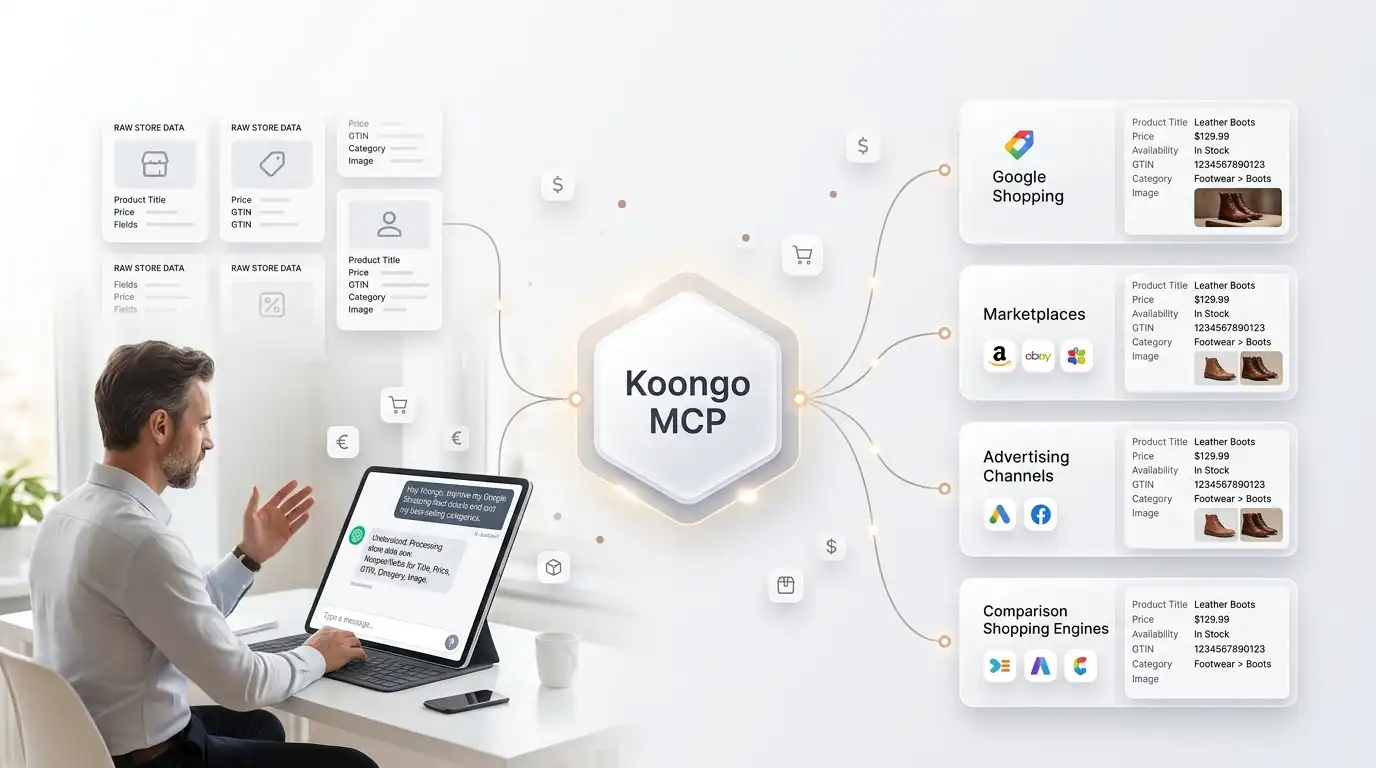
Product feed management is essential when selling or advertising products across multiple ecommerce channels. Each channel can have different requirements for product titles, identifiers, categories, prices, availability, images, and other attributes.
With Koongo MCP, compatible AI assistants can connect to your Koongo account and work with supported product feed management tools using natural-language instructions.
Instead of configuring every part of a product feed manually, you can ask an AI assistant to create a feed, identify missing attributes, help with feed mapping, apply product filters, generate the feed, and verify the result.
This guide explains how AI product feed management works with Koongo MCP, including product attributes, category mapping, Google Shopping feeds, filtering, exporting, and feed verification.
TL;DR: Key Takeaways
- Koongo MCP allows compatible AI assistants to interact with supported product feed management tools in your Koongo account.
- You can use AI to help create product feeds, map attributes and categories, configure filters, export feeds, and verify generated product data.
- AI can help identify missing required product attributes such as GTIN, brand, colour, or other channel-specific information.
- Product filters can control which products are included in a feed, for example only in-stock products or selected product categories.
- For supported API channels, configured product data can also be submitted through the available Koongo integration functionality.
- Koongo provides the underlying product feed infrastructure, while MCP provides a conversational way to interact with supported functionality.
Table of Contents
- What Is AI Product Feed Management?
- Why Product Feed Management Gets Complicated
- How Koongo MCP Works with Product Feeds
- 1. Create a Product Feed with AI
- 2. Map Product Categories
- 3. Map Required Product Attributes
- 4. Choose Which Products to Include
- 5. Export and Verify the Product Feed
- 6. Submit the Feed Where Supported
- Example: Creating a Google Shopping Feed with AI
- AI-Assisted vs Traditional Product Feed Management
- Frequently Asked Questions
What Is AI Product Feed Management?
AI product feed management uses artificial intelligence to assist with preparing, configuring, checking, and distributing structured product data to ecommerce channels.
A product feed is a structured collection of product information used by marketplaces, advertising platforms, comparison shopping engines, and other ecommerce channels.
A typical product feed can contain:
- product ID or SKU,
- title and description,
- price and availability,
- GTIN or EAN,
- brand,
- product category,
- image URL,
- colour, size, and material,
- other channel-specific product attributes.
The challenge is that every destination can structure and validate this information differently.
When an AI assistant is connected to a product feed management platform through MCP, it can help merchants work with the actual feed configuration and product data exposed by that platform.

Why Product Feed Management Gets Complicated
A product catalog that works inside an ecommerce store is not automatically ready for every external channel.
Google Shopping, marketplaces, advertising platforms, and comparison shopping engines can require different fields, category structures, accepted values, and feed formats.
For example, your store might contain a field called EAN, while a destination channel expects that value in a field called GTIN.
Your store might categorize a product as:
Women → Shoes → Running Shoes
while the destination channel uses its own product taxonomy.
This creates several common product feed management tasks:
- mapping store attributes to channel attributes,
- mapping store categories to destination categories,
- transforming product values,
- adding fixed or fallback values,
- filtering which products should be exported,
- checking required fields,
- generating and validating the final feed.
Koongo’s Complete Guide to Product Feed Management explains the underlying process in more detail.
How Koongo MCP Works with Product Feeds
Koongo MCP gives compatible AI assistants access to supported Koongo tools and account context.
This allows the assistant to work with the actual product feed configuration available through your Koongo connection instead of providing only general advice.
A simplified workflow looks like this:
Store Product Data → Koongo → Koongo MCP → AI Assistant
You describe the desired outcome in natural language, and the AI assistant uses the appropriate Koongo MCP tools available to the connection.
For example:
Create a Google Shopping feed for my store, help me map the required attributes, then generate the feed and check it.
The supported workflow can include selecting a feed template, creating the feed, mapping categories and attributes, configuring filters, exporting the feed, and verifying the result.
1. Create a Product Feed with AI
The first step is choosing the destination for your product data.
Koongo provides feed templates for supported ecommerce and advertising channels. Through MCP, you can ask the assistant to find an appropriate template and create the feed.
For example:
Create a Google Shopping feed for my store.
Once the appropriate template is selected, the assistant can create the feed in Koongo and continue with the configuration required by the destination channel.
This is different from asking a general-purpose AI model to generate a spreadsheet or XML file. The assistant is working with Koongo’s product feed management system and the product data available through your connected project.
2. Map Product Categories
Many ecommerce channels organize products using their own category taxonomy.
Category mapping connects categories from your store to the appropriate categories used by the destination channel.
| Your Store Category | Destination Category |
|---|---|
| Women’s Running Shoes | Channel-specific footwear category |
| Men’s Jackets | Channel-specific men’s outerwear category |
| Wireless Headphones | Channel-specific audio category |
With Koongo MCP, you can ask:
Which of my store categories aren’t mapped yet for this feed?
The assistant can inspect the current mapping status and help find suitable categories in the destination taxonomy.
Suggest the best matching target category for each unmapped category.
This can be particularly useful when working with large or unfamiliar channel taxonomies.
Category selection can also affect which product attributes are required, because some channels introduce additional category-specific fields.

3. Map Required Product Attributes
Product attribute mapping determines where each field required by the destination channel gets its value.
For example:
| Channel Attribute | Store Data |
|---|---|
| GTIN | EAN |
| Brand | Manufacturer |
| Color | Product Color |
| Price | Final Price |
With Koongo MCP, you can ask the assistant to identify unresolved required attributes:
Show me which required attributes are still missing on my Google Shopping feed.
You can then work through the missing fields and configure the appropriate feed mapping.
Depending on the configuration, values can come from store fields, fixed values, rules, or fallback values.
| Mapping Method | Example | When to Use It |
|---|---|---|
| Store field | GTIN → EAN | The information already exists in your store |
| Fixed value | Condition → New | The same value applies to relevant products |
| Rule | Set a value based on product conditions | The output changes depending on product data |
| Fallback | Use an alternative when the primary field is empty | Source data is not complete for every product |
Koongo can also work with value mappings when values stored in your ecommerce platform differ from those accepted by the destination channel.
4. Choose Which Products to Include
Not every product in your store needs to appear in every product feed.
You may want to:
- export only products that are currently in stock,
- include selected categories,
- exclude specific product groups,
- filter products using available attributes or conditions.
With an AI-assisted workflow, you can describe the desired result:
Only include products that are currently in stock in this feed.
Or:
Only include products from my Running Shoes and Hiking Shoes categories.
This is useful when the same ecommerce catalog is distributed across multiple channels with different product strategies.
5. Export and Verify the Product Feed
After mapping attributes, configuring categories, or changing product filters, the feed needs to be generated with the updated configuration.
You can ask:
Generate the feed and tell me when it’s ready.
Verification should follow the export.
The generated feed can be checked for issues exposed by the available verification tools, such as missing values or incorrectly configured fields.
Verify the feed and show me a small sample.
A useful workflow is:
Configure → Export → Verify → Fix → Re-export
This gives merchants an opportunity to identify product data or configuration problems before using the feed on the destination channel.

6. Submit the Feed Where Supported
How a product feed reaches its destination depends on the channel and integration type.
| Feed Type | Typical Delivery |
|---|---|
| File feed | The destination retrieves the generated feed, for example through a feed URL |
| Supported API channel | Koongo can submit configured product data through the supported integration |
Koongo MCP can help with submission where the destination and integration support it. File-based feeds that are retrieved by the destination do not require the same submission workflow.
Example: Creating a Google Shopping Feed with AI
Let’s put the individual steps together using a Google Shopping feed as an example.
Step 1: Create the feed
Create a Google Shopping feed for my store and help me configure it.
Step 2: Check category requirements
Inspect whether store categories need to be mapped to the appropriate destination taxonomy.
Step 3: Find missing product attributes
Which required attributes are still missing?
Step 4: Configure attribute mapping
Map available store data to the required destination fields.
Map GTIN to my EAN field.
Step 5: Apply product filters
Only include products that are currently in stock.
Step 6: Export the feed
Generate the feed.
Step 7: Verify the result
Verify the generated feed and show me a sample.
If issues are identified, the configuration can be adjusted and the feed generated again.
The underlying product feed requirements remain the same. Koongo MCP makes it possible to work through supported parts of the workflow conversationally.
AI-Assisted vs Traditional Product Feed Management
| Task | Traditional Workflow | AI-Assisted Workflow with Koongo MCP |
|---|---|---|
| Create a feed | Find a template and configure the feed through the interface | Ask the assistant to find an appropriate template and create the feed |
| Find missing attributes | Inspect requirements and mappings | Ask which required attributes remain unresolved |
| Attribute mapping | Configure individual mappings | Describe how the required fields should be mapped |
| Category mapping | Search the destination taxonomy | Ask the assistant to identify unmapped categories and suggest targets |
| Product filtering | Build filter conditions through the interface | Describe which products should be included |
| Feed verification | Preview and inspect generated data | Ask the assistant to verify the feed and show a sample |
The traditional Koongo interface remains available. MCP adds a conversational interface for supported product feed management tasks.
Why Use AI for Product Feed Management?
Product feed management requires merchants to understand both their own product data and the requirements of each destination channel.
An AI assistant connected to the feed management system can make that interaction more direct.
Instead of starting with “Where is the setting I need?”, the merchant can start with the desired outcome:
Which required attributes haven’t been mapped yet?
Only export products that are in stock.
Verify the feed and tell me what still needs attention.
This changes the starting point from how to navigate the software to what the merchant wants to accomplish.
AI Does Not Replace Product Data Quality
AI-assisted product feed management still depends on the quality of the underlying ecommerce data.
Merchants should continue to maintain:
- accurate product identifiers,
- current prices and inventory,
- high-quality titles and descriptions,
- correct product images,
- structured product attributes,
- channel-specific required information.
Koongo MCP can help work with supported data and mapping tasks, while product enrichment can assist with deriving certain missing attributes such as colour, gender, or material from available product information.
Important product information should still be reviewed before it is used across live ecommerce channels.
Frequently Asked Questions
Yes, when the AI assistant is connected to a product feed management platform that exposes the required tools. With Koongo MCP, a compatible AI assistant can help select a feed template, create a feed, configure supported mappings and filters, export the feed, and verify the generated data.
AI can assist with product feed optimization tasks such as identifying missing required attributes, configuring feed mappings, working with category mappings, applying filters, and checking generated feed data. The available capabilities depend on the connected platform and destination channel.
Yes. A merchant can use Koongo MCP to work through supported product feed creation steps, including creating a Google Shopping feed, configuring required attributes, generating the feed, and checking the result.
Yes. An MCP-connected AI assistant can help identify unresolved product attributes and work with supported mapping options such as store fields, fixed values, rules, and fallback values.
Yes. Koongo MCP can help identify unmapped store categories, search the destination taxonomy, suggest suitable target categories, and work with supported category mappings.
Yes. Product filtering can be used to control which products are included. For example, a merchant can create a feed containing only in-stock products or products matching selected categories or attribute conditions.
No. Koongo provides the underlying product feed infrastructure, including product data processing, templates, mappings, filters, exports, and channel functionality. MCP provides a conversational way for compatible AI assistants to interact with supported Koongo tools.
Conclusion
AI adds a new conversational layer to product feed management.
With Koongo MCP, compatible AI assistants can work with supported Koongo functionality to create product feeds, identify missing product attributes, configure feed mappings, work with categories, apply filters, export feeds, and verify generated product data.
The underlying requirements remain important. Ecommerce channels still need accurate product information, valid attributes, correct categories, and properly configured feeds.
Koongo provides the product feed infrastructure. MCP gives merchants a conversational way to work with it.
For current plans, features, and availability, visit the official Koongo website.
Explore Koongo MCP for AI Assistants
Explore Koongo Product Feed Management
Continue reading →