


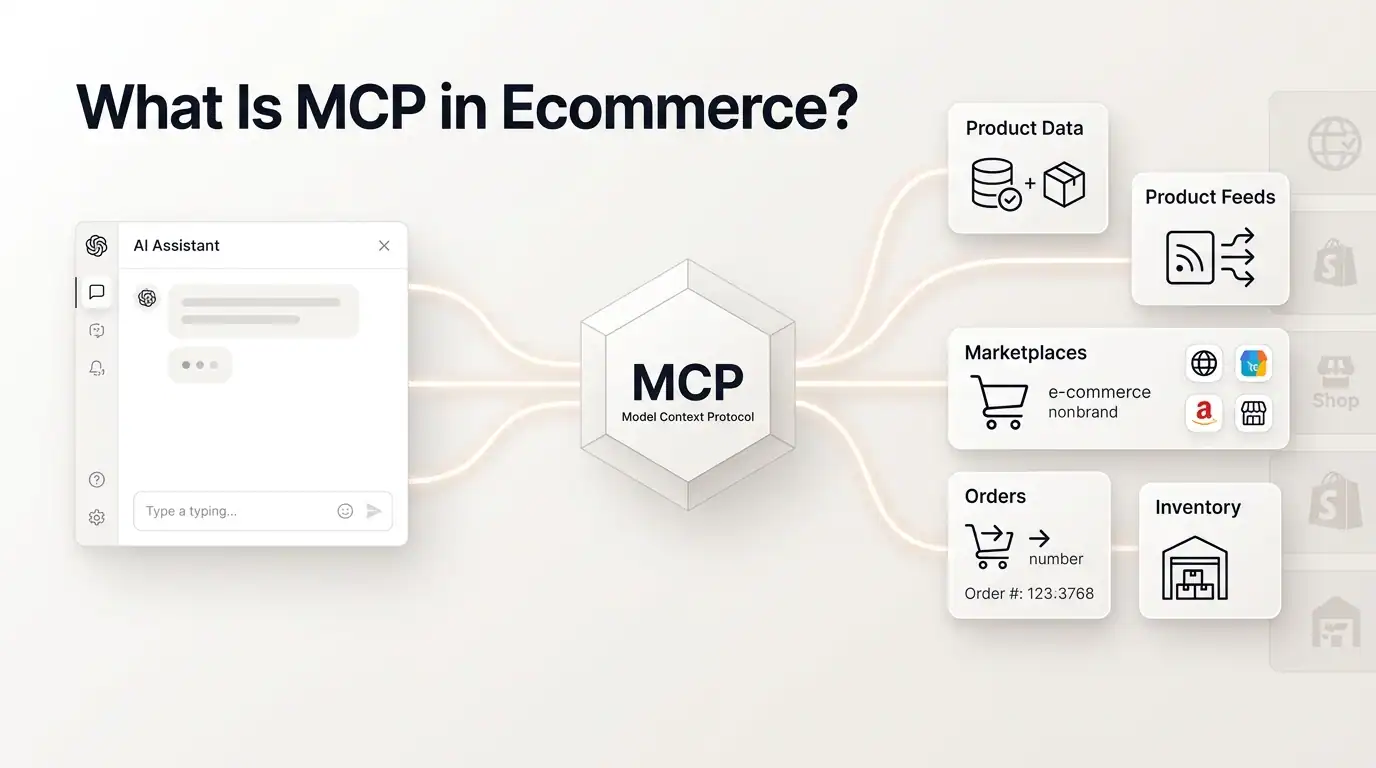
With the Model Context Protocol, an AI assistant can connect to external tools and data sources and interact with them on a user’s behalf. For ecommerce businesses, this creates a new way to work with product data, feeds, marketplace integrations, orders, and other operational systems.
Instead of opening several dashboards and finding the right settings manually, a merchant can increasingly describe what they want to accomplish in natural language.
MCP does not replace ecommerce platforms, marketplace APIs, product feeds, or integration software. It creates a standardized way for compatible AI applications to connect to these systems and use the tools they expose.
This article explains what MCP is, how it can be used in ecommerce, what it can and cannot do, and how platforms such as Koongo are beginning to use MCP for real multichannel ecommerce workflows.
TL;DR: Key Takeaways
- MCP stands for Model Context Protocol, an open standard for connecting AI applications to external systems, tools, and data sources.
- In ecommerce, MCP can allow an AI assistant to interact with systems responsible for product data, feeds, marketplace integrations, orders, and other operations.
- MCP is a connection standard, not an ecommerce platform or AI model. What an assistant can actually do depends on the tools exposed by the connected service and the permissions granted to it.
- Merchants can use natural-language instructions instead of manually navigating every part of a software interface for supported workflows.
- Permissions matter. An MCP connection can be designed to provide only data access or to allow supported write actions as well.
- Koongo MCP is a practical ecommerce implementation that allows compatible AI assistants to work with supported marketplace integrations, product feeds, mappings, product enrichment, and orders.
Table of Contents
- What Is MCP?
- How Does MCP Work?
- Why Does MCP Matter for Ecommerce?
- MCP vs API: What Is the Difference?
- What Can MCP Be Used for in Ecommerce?
- MCP and Product Feed Management
- MCP and Marketplace Integrations
- Permissions and Safety
- Koongo MCP: A Practical Ecommerce Example
- What Could MCP Mean for the Future of Ecommerce?
- Frequently Asked Questions
What Is MCP?
MCP, or Model Context Protocol, is an open standard that allows AI applications to connect to external systems and work with the tools and data those systems make available.
The protocol was originally introduced by Anthropic and is now developed as an open-source project with support across a growing AI ecosystem.
You can find the technical specification and current documentation on the official Model Context Protocol website.
The easiest way to understand MCP is to think about the difference between an AI assistant that only knows what you type into a conversation and one that can securely connect to a business system.
Without a connection, an AI assistant might be able to explain how a product feed works.
With the appropriate MCP connection and permissions, it could potentially inspect an actual feed, identify missing information, and use the tools provided by the connected platform to help configure it.
The exact capabilities depend on the MCP server.
An MCP server decides which tools and resources are available to an AI application. One service might expose only read-only information, while another might expose tools that allow supported changes to be made.

How Does MCP Work?
At a simplified level, an MCP setup usually involves three parts:
- An AI application that supports MCP.
- An MCP server that exposes specific tools or resources.
- The underlying service or data that the MCP server provides access to.
For an ecommerce workflow, that could look like this:
Merchant → AI Assistant → MCP Server → Ecommerce Platform or Integration Tool → Sales Channels
The merchant talks to the AI assistant.
The assistant determines which available tool is relevant to the request.
The MCP server provides a structured way for the assistant to call that tool.
The underlying ecommerce service then performs or returns the supported operation.
Importantly, the AI assistant does not automatically gain unlimited access to the connected system simply because MCP is being used.
What the assistant can see or change depends on how the MCP server is designed, which tools it exposes, how authentication works, and which permissions the user grants.
A simple ecommerce example
Imagine that a merchant wants to know which product attributes are missing from a Google Shopping feed.
Without an integration, the merchant might ask an AI assistant:
Which attributes does Google Shopping normally require?
The assistant can provide general information, but it cannot inspect the merchant’s actual product data.
With an appropriate MCP connection, the request could instead be:
Check my Google Shopping feed and show me which required attributes are still missing.
The connected ecommerce service can provide the relevant account context and tools, allowing the assistant to work with the merchant’s actual configuration rather than only general knowledge.
Why Does MCP Matter for Ecommerce?
Ecommerce operations are fragmented across many systems.
A merchant may use an ecommerce platform such as Shopify, WooCommerce, Magento, PrestaShop, or another store platform while simultaneously working with marketplaces, advertising platforms, comparison shopping engines, analytics tools, fulfillment systems, and other services.
Each system has its own dashboard, terminology, workflows, and configuration.
This becomes particularly noticeable in multichannel ecommerce.
Connecting a store to Amazon, Google Shopping, eBay, bol.com, Kaufland, Meta, and other channels can involve product attributes, category taxonomies, feed specifications, inventory information, listing requirements, and order synchronization.
Platforms such as Koongo already bring many of these operations together by connecting ecommerce stores to marketplaces, advertising platforms, and other sales channels.
MCP adds another possible layer on top: a conversational interface through which an AI assistant can interact with supported ecommerce tools.
From graphical interfaces to conversational interfaces
Traditional software requires users to understand the interface.
You need to know where the relevant menu is, which settings control the operation, and how the workflow is structured.
With an AI assistant connected through MCP, the starting point can instead be the desired outcome.
For example:
Only include products that are currently in stock in this feed.
Or:
Show me which categories still need mapping.
The graphical interface does not disappear. It remains useful for visual configuration, verification, monitoring, and many other tasks.
MCP simply introduces another way to interact with the underlying software.
MCP vs API: What Is the Difference?
MCP and APIs are related, but they are not the same thing.
An API provides a defined way for software systems to communicate with each other.
MCP provides a standardized way for AI applications to discover and use tools and resources exposed by an MCP server.
| Area | Traditional API | MCP |
|---|---|---|
| Primary purpose | Software-to-software communication | Connecting AI applications to tools and context |
| Typical user | Developer or another application | AI application acting on a user’s request |
| Interaction | Application calls predefined endpoints | AI can discover and use exposed tools through a standardized protocol |
| Natural language | Usually requires another application layer | The AI assistant can translate a user’s natural-language request into appropriate tool usage |
| Underlying APIs | Can directly power the integration | MCP tools may themselves interact with existing APIs and services |
MCP therefore should not be understood as a replacement for APIs.
In many implementations, APIs and existing backend systems continue doing the actual work. MCP provides an AI-friendly interface for discovering and interacting with selected capabilities.

What Can MCP Be Used for in Ecommerce?
The answer depends entirely on what a particular ecommerce MCP server exposes.
MCP itself does not automatically provide marketplace management, order synchronization, feed optimization, or product enrichment.
Those capabilities must be implemented by the service behind the MCP server.
However, ecommerce systems can expose tools for workflows such as:
- inspecting product catalogs,
- creating or configuring product feeds,
- checking missing product attributes,
- mapping attributes to channel requirements,
- mapping product categories,
- creating marketplace integrations,
- checking integration status,
- working with inventory information,
- viewing marketplace orders,
- managing supported order connections,
- validating data before publication,
- troubleshooting configuration problems.
This is where the distinction between MCP as a protocol and the ecommerce platform connected through MCP becomes important.
The protocol provides the connection. The ecommerce platform provides the actual capabilities.
MCP and Product Feed Management
Product feed management is one area where conversational AI can be particularly useful because feeds involve both structured data and channel-specific requirements.
A product feed contains information that a destination channel needs about the products a merchant wants to advertise or sell.
Depending on the channel, this can include:
- product IDs and SKUs,
- titles and descriptions,
- prices,
- availability,
- GTINs and other identifiers,
- brands,
- images,
- categories,
- colours,
- materials,
- other channel-specific attributes.
Merchants often need to map their store data to the format expected by a destination such as Google Shopping, Meta, a comparison shopping engine, or another sales channel.
For a deeper explanation of this process, see the Complete Guide to Product Feed Management.
Where an AI assistant can help
If the feed management platform exposes the required capabilities through MCP, a merchant could make requests such as:
Create a Google Shopping feed using my store data.
Which required fields are missing?
Map my store’s colour attribute to the destination colour field.
Only include products that are currently in stock.
The important distinction is that the AI is not inventing a product feed independently.
It is using the tools and product data provided by the connected feed management platform.
Koongo, for example, supports product feed management across hundreds of sales and advertising channels, with functionality including templates, attribute mapping, rules, filtering, category mapping, feed preview, and submission methods.

MCP and Marketplace Integrations
Marketplace integration is more complex than simply exporting a file.
A marketplace connection may involve:
- merchant account authorization,
- product identifiers,
- listing requirements,
- category mapping,
- attribute mapping,
- product filtering,
- pricing rules,
- inventory synchronization,
- order synchronization.
You can read more about the underlying process on Koongo’s Marketplace Integration page.
An MCP-connected ecommerce platform can make parts of this workflow conversational.
Instead of manually starting each step, the merchant might ask:
I want to start selling on Amazon. Create the integration and walk me through the setup.
The AI assistant can then use whatever marketplace integration tools the connected MCP server exposes.
Some steps will still require direct user interaction.
For example, marketplace authentication and authorization may need to be completed securely in the merchant’s browser rather than by the AI assistant.
MCP therefore does not eliminate the technical requirements of marketplace integration. It can make supported configuration and management tasks easier to access through natural language.
Permissions and Safety
Connecting an AI assistant to ecommerce operations raises an obvious question: what is the AI allowed to do?
The answer should depend on the permissions provided by the connected service.
This distinction is particularly important because reading information and modifying a live ecommerce setup carry very different levels of risk.
| Permission type | Example | Potential impact |
|---|---|---|
| Read | List integrations or inspect a feed | Retrieves information without changing the setup |
| Write | Create a feed or change a mapping | Modifies the ecommerce configuration |
| Live publishing | Publish products to a marketplace | Can affect live listings and customers |
A good MCP implementation should therefore provide clear access controls and appropriate safeguards for sensitive actions.
Koongo’s approach
Koongo MCP provides Read-only and Full Access connection modes.
A Read-only connection allows supported inspection operations without permitting write tools. Full Access allows supported changes to be made.
According to the current Koongo MCP documentation, actions that would publish products to a live channel are also protected by a safety step.
This allows merchants to choose an access level based on how they want to use the AI assistant.
Someone experimenting with MCP for the first time might start with Read-only access, while a merchant who wants the assistant to configure supported integrations or feeds can use Full Access.
Koongo MCP: A Practical Ecommerce Example
Koongo MCP connects compatible AI assistants to Koongo and allows merchants to interact with supported multichannel ecommerce functionality through conversation.
Koongo MCP is available to every user on Koongo’s current pricing plans, including the Free Plan, with no separate add-on or extra cost to connect an AI assistant to an account.
Current Koongo MCP documentation covers workflows including:
- creating marketplace and advertising integrations,
- attribute mapping,
- product enrichment,
- category mapping,
- creating and exporting product feeds,
- viewing and managing supported order connections,
- Read-only and Full Access permissions.
Compatible AI clients currently used with Koongo MCP include Claude, ChatGPT, Gemini, Cursor, and other clients capable of connecting to the Koongo MCP server.
For example, instead of manually navigating through several configuration screens, a merchant could ask:
Create a Google Shopping feed for my store, help me map the required attributes, then generate the feed and verify it.
Or:
Show me which products are missing GTINs.
Or:
List my current marketplace integrations and show me what needs attention.
The assistant uses the Koongo tools available through the MCP connection rather than attempting to perform these ecommerce operations from general AI knowledge alone.
This distinction is important.
The AI provides the conversational interface. Koongo provides the ecommerce infrastructure, product data, marketplace connections, feeds, mappings, and supported operations behind it.
Traditional Ecommerce Workflow vs MCP-Assisted Workflow
| Task | Traditional workflow | MCP-assisted workflow |
|---|---|---|
| Check integrations | Open the platform and inspect integrations individually | Ask the AI assistant to list or inspect supported integrations |
| Create a product feed | Navigate through feed setup and configuration screens | Describe the desired feed and let the assistant guide supported configuration |
| Find missing attributes | Inspect feed requirements and mappings manually | Ask which required attributes are missing |
| Category mapping | Search the destination taxonomy and create mappings | Ask the assistant to inspect unmapped categories and suggest supported mappings |
| Troubleshooting | Inspect settings, logs, documentation, and configuration | Ask the assistant to inspect available information and explain potential problems |
The main advantage is not necessarily that every individual operation becomes completely automatic.
The larger change is that merchants can increasingly start with their desired outcome rather than with the structure of the software interface.
What Could MCP Mean for the Future of Ecommerce?
MCP is still relatively new, and ecommerce adoption is only beginning.
It would therefore be premature to claim that dashboards or traditional ecommerce software interfaces are disappearing.
A more realistic development is that ecommerce platforms will offer multiple ways to interact with the same underlying systems.
A merchant may use a dashboard when they want a visual overview, an API when building a custom automation, and an AI assistant connected through MCP when natural-language interaction is more convenient.
This could be particularly valuable as ecommerce operations become more complex.
Merchants selling across multiple channels need to manage increasingly large amounts of structured product information, channel requirements, marketplace configurations, and operational data.
AI assistants become more useful in this environment when they can work with actual business systems rather than relying only on information pasted manually into a conversation.
From answering questions to taking supported actions
This may be the most important shift.
The first generation of generative AI tools primarily answered questions and generated content.
Connected AI systems can go further.
Instead of only explaining how category mapping works, an assistant can potentially inspect the merchant’s actual mapping status.
Instead of explaining how to create a product feed, it can use a connected feed management tool to help create one.
Instead of describing marketplace integration in general, it can guide a merchant through supported steps using their actual ecommerce setup.
The quality and safety of those experiences will depend on the underlying platform, the tools exposed through MCP, and the permissions granted by the merchant.
That is why MCP should be viewed as a connection standard rather than as ecommerce automation by itself.
Frequently Asked Questions
MCP stands for Model Context Protocol. In ecommerce, it can be used to connect compatible AI applications to ecommerce tools and data. This can allow an AI assistant to inspect information or perform supported ecommerce tasks, depending on the capabilities exposed by the connected MCP server and the permissions granted by the user.
No. MCP is a protocol for connecting AI applications to external tools and data sources. Ecommerce functionality such as product feed management, marketplace integrations, inventory synchronization, and order management still comes from the ecommerce platforms and services connected through MCP.
An API provides a defined interface for software systems to communicate. MCP provides a standardized way for AI applications to discover and use tools and resources made available by an MCP server. MCP implementations can use existing APIs and backend systems to perform the underlying operations.
Potentially, yes, but MCP itself does not provide marketplace connectivity. An ecommerce platform must expose the relevant marketplace integration tools through its MCP server. For example, Koongo MCP exposes supported tools for creating and managing marketplace and advertising integrations.
It depends on the permissions and tools provided by the MCP implementation. Some connections can be Read-only, while others can allow supported write operations. Merchants should review the access controls of the specific MCP service before granting an AI assistant permission to make changes.
MCP support is available across a growing range of AI applications and development tools. The exact connection method depends on the MCP server and client. Koongo MCP, for example, is currently used with clients including Claude, ChatGPT, Gemini, and Cursor. Always check the current documentation of the service you want to connect.
Koongo uses MCP to provide compatible AI assistants with access to supported ecommerce tools and account context. Current capabilities include marketplace and advertising integrations, product feed creation and export, attribute and category mapping, product enrichment, order-related workflows, and account inspection. Koongo provides both Read-only and Full Access connection modes.
Conclusion
Model Context Protocol introduces a new way for AI applications to interact with ecommerce software.
Instead of treating an AI assistant as a separate tool that only answers questions, MCP can connect it to the systems that contain actual ecommerce data and functionality.
For merchants, this can make supported workflows more conversational. Product feeds can be inspected through natural-language requests. Missing attributes can be identified. Marketplace integrations can be configured with AI guidance. Orders and account configurations can be inspected without manually navigating every screen.
But the distinction between the AI assistant and the ecommerce infrastructure remains important.
MCP provides the connection. The connected ecommerce platform provides the actual tools, data, permissions, and operations.
Koongo is one practical example of this approach. Koongo MCP connects compatible AI assistants with supported product feed, marketplace integration, product data, and order-management functionality.
If you want to understand the underlying ecommerce workflows first, explore Product Feed Management or learn how Koongo handles Marketplace Integration.
Explore Koongo MCP for AI Assistants
Explore Koongo and start selling on more channels
Continue reading →